Facebook Cookbook - Jay Goldman [89]
Now we’ll need a trigger for the dialog so that it knows when to open. As covered in Dialogs That Pop, you can use pretty much anything as a trigger provided you specify a clicktoshowdialog property on it. In this case, I’ve used Flickr’s awesome Creative Commons search to find a photo of some tasty ice cream (“Trio of Summer Fruit Ice Cream” by jessicafm) that we’ll use as a button:
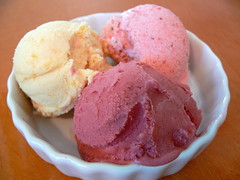 alt="Trio of Summer Fruit Ice Creams by jessicafm"
clicktoshowdialog="ice_cream"/>
Photo credit: jessicafm, http://flickr.com/photos/jessicafm/855848513/
So far, we have a button on our page, shown in Figure 6-54.
Figure 6-54. Dialog trigger
Clicking on our button gives us our dialog overlaid on our Canvas, as shown in Figure 6-55.
Figure 6-55. Dialog triggered
Now we need to put our response page in place so that clicking the “For Ice Cream!” button will go fetch the resulting FBML and display it. You need to use a URL for clickrewriteurl that isn’t on Facebook (but can be on the server that hosts your app), so instead of something like http://apps.facebook.com/myapp/ice_cream_maker.php, go straight to the source at http://www.myhostingserver.com/ice_cream_maker.php. Normally, you would build some slick server-side processing here that would take the person’s favorite flavor and perform some deep business analysis using data warehouse cubes to calculate an executive dashboard charting flavor versus education level versus bed linen thread count. We’re just going to return a photo of the ice cream flavor they asked for. The most important thing to remember about what you return is that it needs to be wrapped in FBML tags:
$flickr = 'http://farm2.static.flickr.com/1339/855848513_515a9f66ba_m.jpg';
$credit = 'jessicafm';
switch($_POST['flavors']){
case 'chocolate':
$flickr = 'http://farm2.static.flickr.com/1036/1072040703_6f657ebdbe_m.jpg';
$credit = 'Zesmerelda';
break;
case 'vanilla':
$flickr = 'http://farm2.static.flickr.com/1126/932883287_821c96d904_m.jpg';
$credit = 'skye820';
break;
case 'rockyroad':
$flickr = 'http://farm2.static.flickr.com/1132/734813872_63e3105b62_m.jpg';
$credit = 'jessicafm';
break;
case 'moosetracks':
$flickr = 'http://farm2.static.flickr.com/1401/1064233083_18445730bb_m.jpg';
$credit = 'lucianvenutian';
break;
}
echo ' Photo credit: ' . $credit . '
?>
OK! That should just about do it. Now when you click the “For Ice Cream!” button, you see one of the Flickr photos below the drop-down, as shown in Figure 6-56.
FINDING CC PHOTOS ON FLICKR
The Flickr Advanced Search is a great resource to find Creative Commons–licensed photos for just about anything. You can find the search at http://flickr.com/search/advanced/, and you’ll want to scroll down to the bottom and turn on at least the “Only search within Creative Commons (CC) licensed content” and “Find content to use commercially” options. If you plan to modify the content (like putting text over the image or manipulating it in any way), add in the “Find content to modify, adapt, or build upon” option as well. The CC license terms for each photo can be found in the righthand sidebar when you’re on the photos page, and you’ll see that some don’t even require attribution (though I always give it if I can). If the search isn’t finding what you need, try the actual CC search at http://search.creativecommons.org/. And remember, kids: you should license your photos under a CC license so that other people can benefit from them, too.
Figure 6-56. Dialog with Ajax result
Since this is an Ajax-based form, changing the drop-down and clicking the “For Ice Cream!” button again will just load a different image in place of the first one (though I have no idea why anyone would stray from the path of Extreme